Data Collection
How to use AI-powered data collection to automatically extract structured insights from every conversation — product issues, cancellation reasons, customer behavior, bot performance, and more.
Every conversation contains valuable information — why a customer is unhappy, what product they're interested in, whether the bot handled the issue well, what the customer ultimately wanted. Data Collection lets you automatically extract this information and turn it into structured, reportable data.
You define the questions. The AI reads every conversation and answers them for you.
This isn't a simple tagging system. The prompt field accepts natural language instructions — the same frontier AI models that power your bot will interpret them. This means you can extract almost anything: product defects, cancellation reasons, customer sentiment, purchasing power, language, retention outcomes, security concerns, and patterns you haven't thought of yet.
How to think about data collection
The core idea is simple: each data collection field is an AI prompt that runs against the full conversation after it closes. You tell the AI what to look for, give it the possible values, and it classifies every conversation automatically.
This makes data collection extremely flexible. It's not limited to what the customer said — the AI can analyze the entire interaction, including how the bot responded. Some examples of what this enables:
- What happened — What product issue did the customer report? What was the cancellation reason?
- What the customer wanted — Were they looking for a refund? A specific product category? A payment link?
- How it was resolved — Was the subscription saved? Did the bot offer the right solution? Did the customer accept it?
- Who the customer is — What language do they speak? What's their budget range? Are they a first-time buyer?
- How the bot performed — Did the bot offer partial refunds when it shouldn't have? Did it leak another customer's data?
Think of each field as a question you'd want answered about every conversation — then let the AI answer it at scale.
Setting up data collection fields
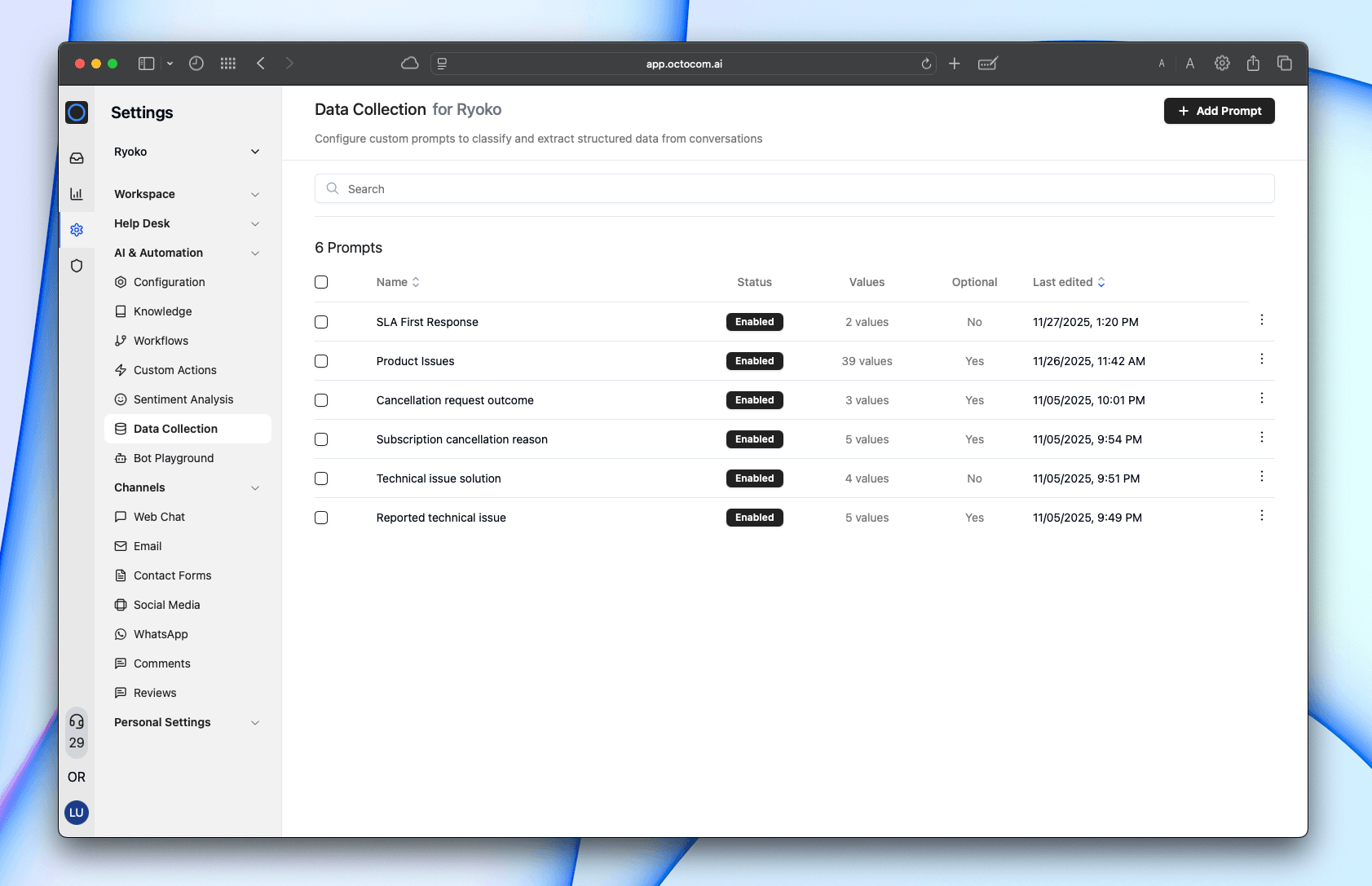
Create and manage data fields in Settings → AI & Automation → Data Collection.
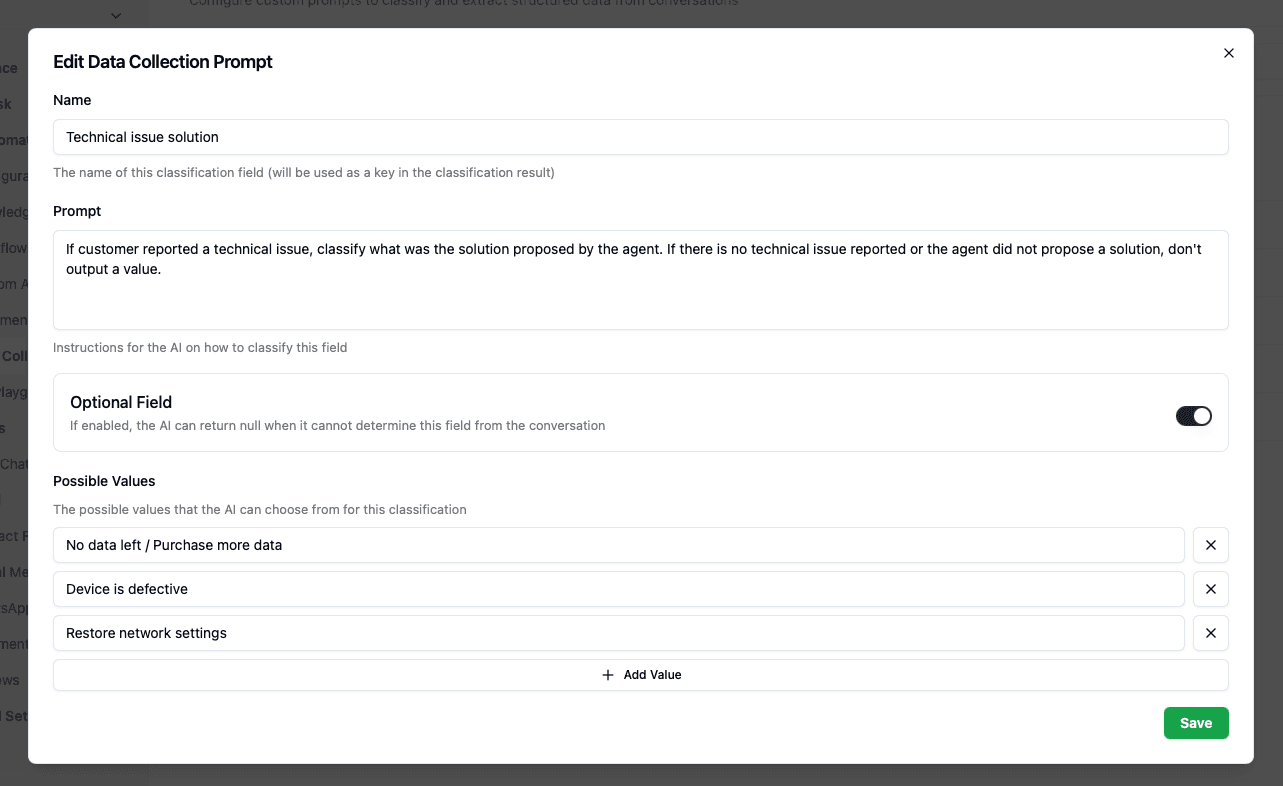
Each field has three settings:
| Setting | What it does |
|---|---|
| Name | How the field appears in analytics. Choose something clear and descriptive. |
| Prompt | Natural language instructions that tell the AI what to look for and how to classify it. This is where the power is — see writing good prompts below. |
| Possible values | The specific values the AI can assign. Can be detailed categories, simple Yes/No, or anything in between. |
| Optional field | When enabled, the AI only assigns a value if it finds relevant information. (Recommended for most fields — many won't apply to every conversation.) |
How it works
The first time a conversation is closed or handed off, the AI:
- Reviews the conversation transcript as it stands at that moment — every message exchanged so far (see when classification runs for details on timing)
- Evaluates each data collection field against the conversation
- Required fields are always classified
- Optional fields are only classified when the conversation contains relevant information
- Assigns the most appropriate value for each field
- Saves the results for reporting, filtering, and analysis
What the classifier sees — and what it doesn't
This is the single most important thing to understand, and the most common source of surprising results.
When a field runs, the AI receives exactly two things:
- The conversation transcript — every message, each tagged as either
customeroragent, with timestamps. - Your prompt and possible values.
That's it. The classifier does not see any of your bot's configuration. It has no knowledge of:
- Your workflows, bot rules, or instructions
- Your knowledge base or help articles
- Your refund / return / escalation policy
- Which actions or tools the bot was allowed to use
- Why the bot did what it did
The prompt is the classifier's entire universe. If a correct judgment depends on a policy, the classifier only knows that policy if you write it into the prompt.
Worked example: the "policy-blind" false negative
A business created a field:
"Classify the AI's answer quality as Excellent / Good / Poor / Incorrect-Risky…"
A customer demanded a full refund. This business's actual policy is to offer a partial refund (keep the item) instead — and the bot did exactly that, correctly. The classifier marked the conversation Poor, reasoning: "the customer asked for a full refund and the agent offered a partial refund instead."
The bot behaved correctly by design. But nobody told the classifier that partial-instead-of-full is the intended policy, so it judged the conversation against the customer's demand and flagged correct behavior as a failure.
The fix is always the same — put the rule in the prompt:
"Offering a partial refund instead of a full refund is correct company policy and must NOT be marked down. Only mark 'Poor' if the bot invented a policy, gave factually wrong information, or ignored the customer entirely."
It cannot reliably tell the bot apart from a human agent
Every non-customer message — whether written by your AI bot or a human agent — is labeled agent in the transcript the classifier sees. A prompt like "judge only the bot's messages, not the human agent's" therefore can't be honored reliably: the classifier has no dependable way to tell them apart. If a conversation was also touched by a human, expect noise on any bot-only quality field.
Avoid vague "was it correct?" fields
It's tempting to write one field that asks "Did the bot follow the process correctly?" or "Was the answer correct?". These are the least reliable fields you can create, for two reasons:
- No ground truth. As above, the classifier doesn't have your process or policy, so "correct" collapses into the model's own opinion. Across many conversations that reads as close to random.
- It's self-grading. The same kind of AI that produced the bot's behavior is being asked to judge whether that behavior was right. If the bot's decision looked reasonable, the judge tends to bless it — even when it quietly broke a rule the judge can't see.
Prefer specific, factual, observable questions — things the classifier can answer straight from the transcript without knowing your policy:
- "Did the bot offer a partial refund? Yes / No"
- "Did the bot escalate to a human when the customer threatened a chargeback? Yes / No"
- "Did the bot mention the 30-day return window? Yes / No"
You then compare those facts against your policy yourself, in analytics — which is where the policy knowledge actually lives. Fine-grained fields take more work to set up, but they produce data you can trust.
When classification runs
A conversation is classified once, the first time it is either closed or handed off to a human — whichever happens first. The result is stored, and that classification is not recomputed later:
- Editing a field's prompt only affects conversations classified after the change. It does not re-grade conversations that were already scored.
- Reopening a conversation, a reply added after a handoff, or closing it a second time does not trigger re-classification.
- Newly added fields take a short while to appear in analytics as conversations are indexed.
Because classification happens at that first close or handoff, the transcript the classifier reads reflects the conversation as it stood at that moment. When a conversation is handed off, this is typically the exchange between the customer and the bot up to the point of handoff. Keep this in mind when designing fields: they work best when they ask about the customer and the bot's handling, rather than about what happens later in the conversation.
Writing good prompts
The prompt is the most important part of a data collection field. It tells the AI what to look for and how to decide between values. The AI is capable of following nuanced, multi-step logic — don't be afraid to write detailed instructions.
Be specific about when to classify
The most common mistake is not telling the AI when to skip classification. If a field only applies to certain conversations, say so explicitly:
"This categorization should only be performed if the customer has requested a subscription cancellation. If no subscription cancellation was requested, output null."
"If the customer is not reporting a technical issue, don't output a value."
Without this guidance, the AI may force-fit a value to conversations where the field doesn't apply.
Tell the AI how to handle edge cases
Good prompts anticipate ambiguity:
"If no reason was provided, output 'No reason provided'. If none of the cancellation reasons match, output 'Other'."
"If the concern does not match any known values, classify as 'Others'. If the conversation is not product-related, leave blank."
You can analyze the bot's behavior, not just customer messages
The AI reads the whole transcript — including the bot's own responses. This means you can use data collection to audit how the bot behaved, not only what the customer said:
"Return 'Yes' if the bot offered partial refunds, otherwise output 'No'."
"If the bot provided information about the wrong person and the customer complained about it, output 'Yes'. Otherwise, output 'No'."
(See when classification runs for how timing affects which messages are available to the classifier.)
Complex logic works
The AI can follow multi-step reasoning. You can combine multiple conditions into a single field:
"Q1: Did the customer ask for money back? Q2: Did the customer ask to cancel their subscription? Q3: What was the outcome? Classify as 'SS Saved' if subscription was retained, 'Refund Saved' if refund was avoided, or the appropriate combination. IMPORTANT: A subscription being cancelled is NOT a 'refund not saved'."
Use case ideas
Data collection is underutilized by most businesses. Here are concrete ways to extract value from conversations you're already having.
Product and service issues
The most common use case — classify what went wrong so you can spot trends and fix root causes.
| Field name | What to track | Example values |
|---|---|---|
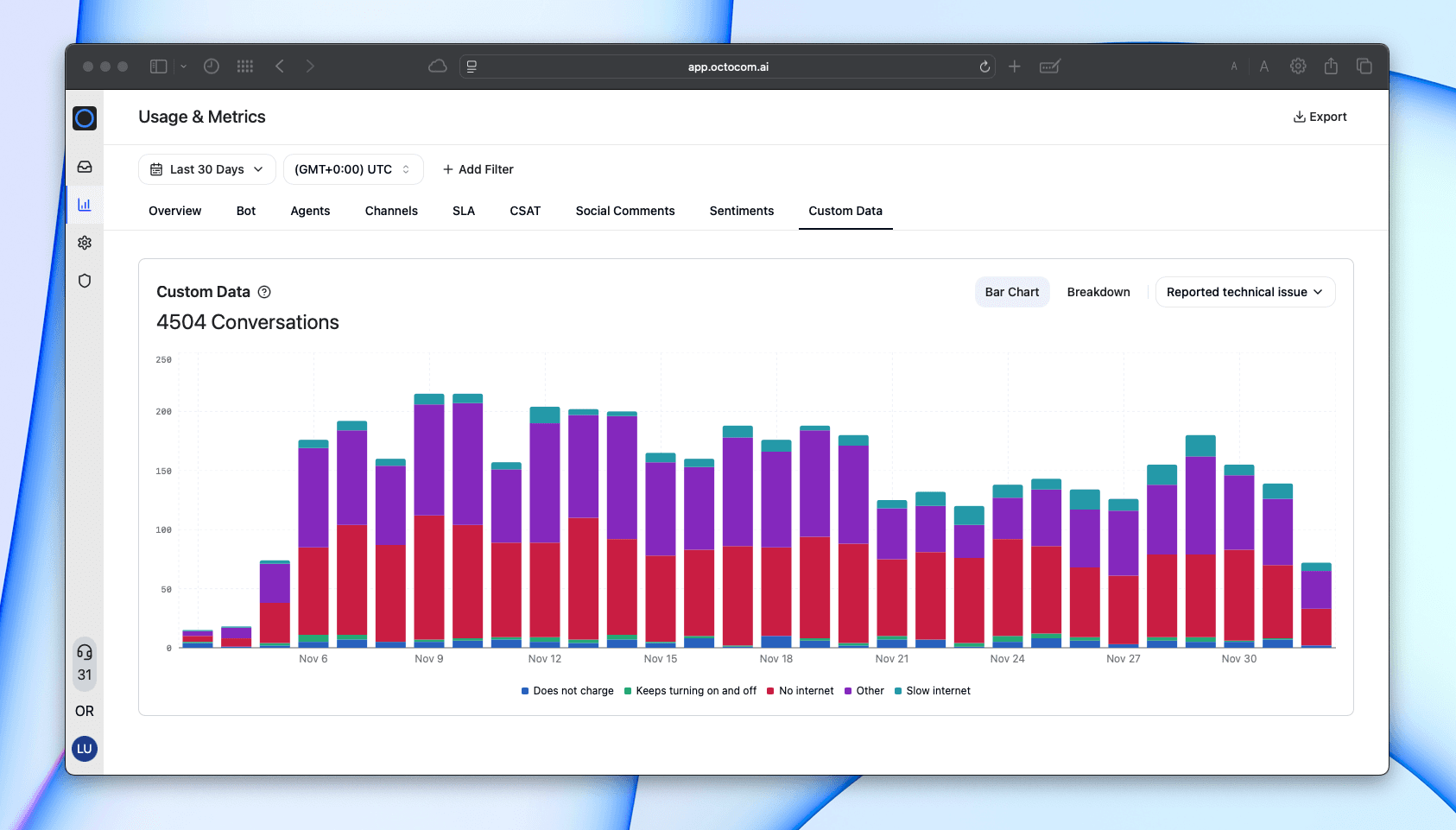
| Product issues | The specific defect or complaint the customer reports | Damaged, Defect, Missing Items, Not as Advertised, Wrong Size, Adverse Reaction, Others |
| Packaging issues | Whether the product arrived in poor condition | Broken seal, Damaged container, Missing parts, Leaks |
| Delivery problems | What went wrong with shipping | Delay, Lost shipment, Damaged on arrival |
Tailor the possible values to your specific products. A knife brand tracks "Bent Blade, Blunt Blade, Broken Tip, Chipped Blade, Rust, Loose Handle." A pillow brand tracks "Flat Pillow, Odor/Smell, Cover Size, Damaged Zipper." The more specific your values, the more actionable your data.
Cancellation and retention
Understand why customers leave — and whether your retention efforts work.
| Field name | What to track | Example values |
|---|---|---|
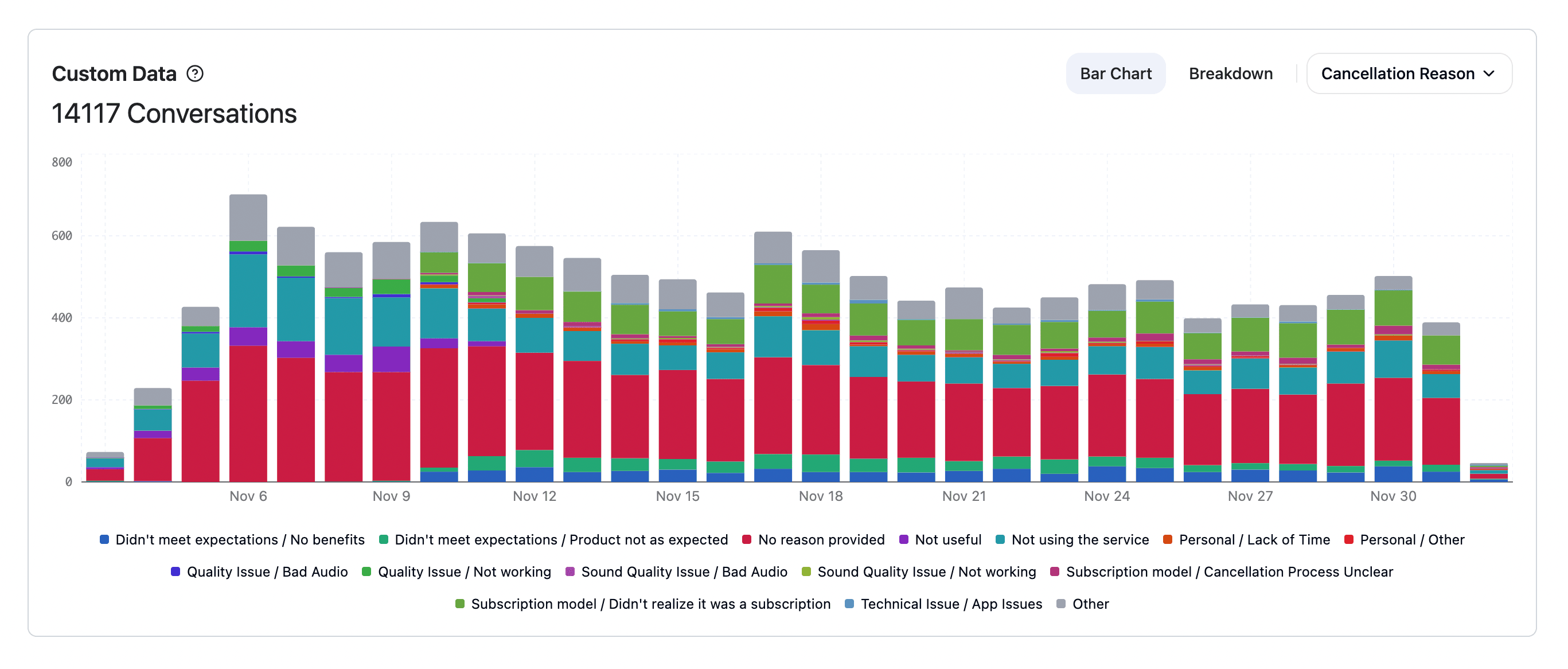
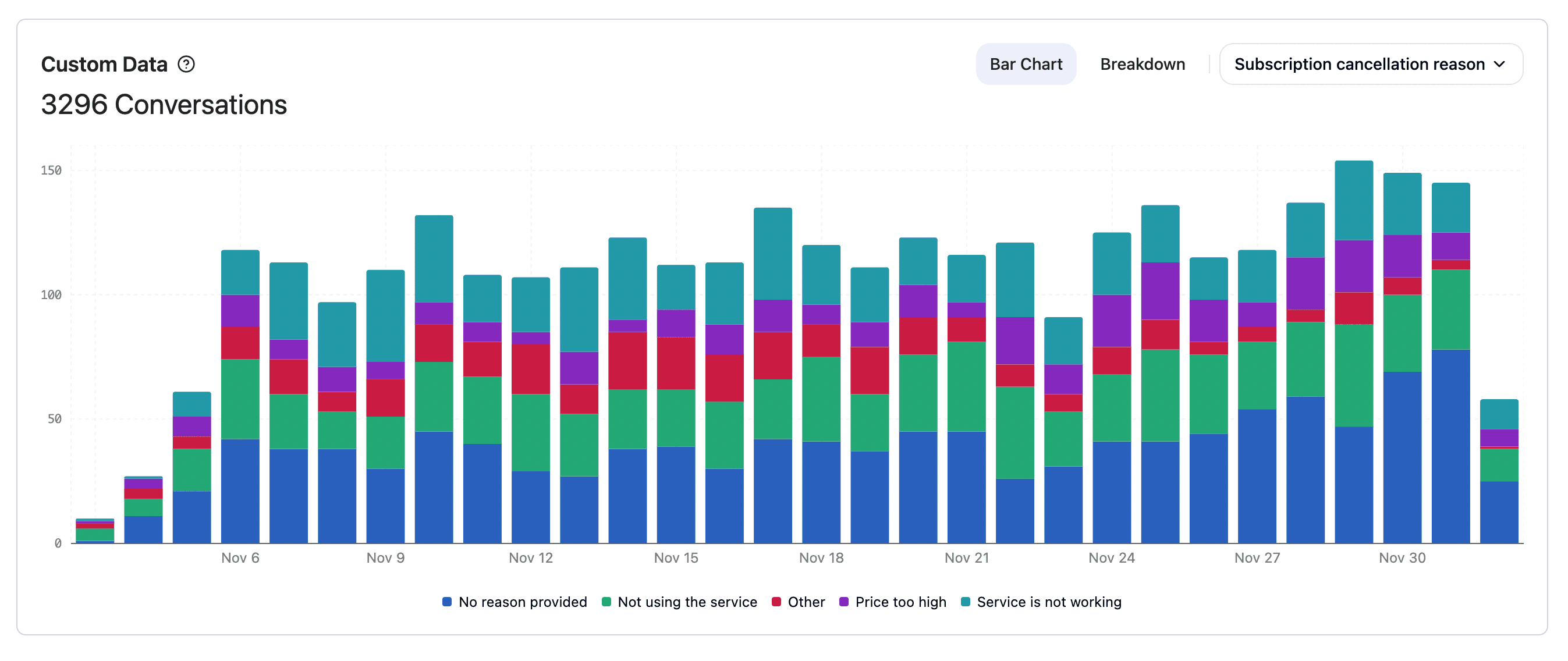
| Cancellation reason | Why the customer wants to cancel their subscription | Too expensive, Not using the service, Didn't meet expectations, Technical issues, Personal reasons, No reason provided |
| Cancellation outcome | Whether the customer was retained | Cancelled, Paused, Customer changed their mind |
| Retention outcome | Whether a refund or subscription cancellation was prevented | Subscription Saved, Subscription Not Saved, Refund Saved, Refund Not Saved |
| Return reason | Why the customer is returning a product | Allergic reaction, Bad quality, Better alternative, Damaged, Financial reasons, No results, Too much product |
Customer insights
Learn about who your customers are and what they want.
| Field name | What to track | Example values |
|---|---|---|
| Language | What language the customer communicates in | English, Spanish, French, German, Portuguese, Italian |
| Purchasing power | The customer's stated budget range | Under $10k, $10k-$20k, $20k-$40k, $40k+ |
| Product interest | What type of product the customer is looking for | Computers, Individual components, Protein powder, Multivitamin |
| Customer satisfaction | How the customer felt after receiving advice | Very satisfied, Neutral, Not satisfied |
Bot quality and behavior
Monitor how the bot performs — without manual QA.
| Field name | What to track | Example values |
|---|---|---|
| Bot behavior audit | Whether the bot did something it shouldn't have | Offered partial refund, Leaked customer data, Behaved correctly |
| Troubleshooting outcome | Which step resolved the customer's technical issue | Restart device, Factory reset, APN change, Not resolved |
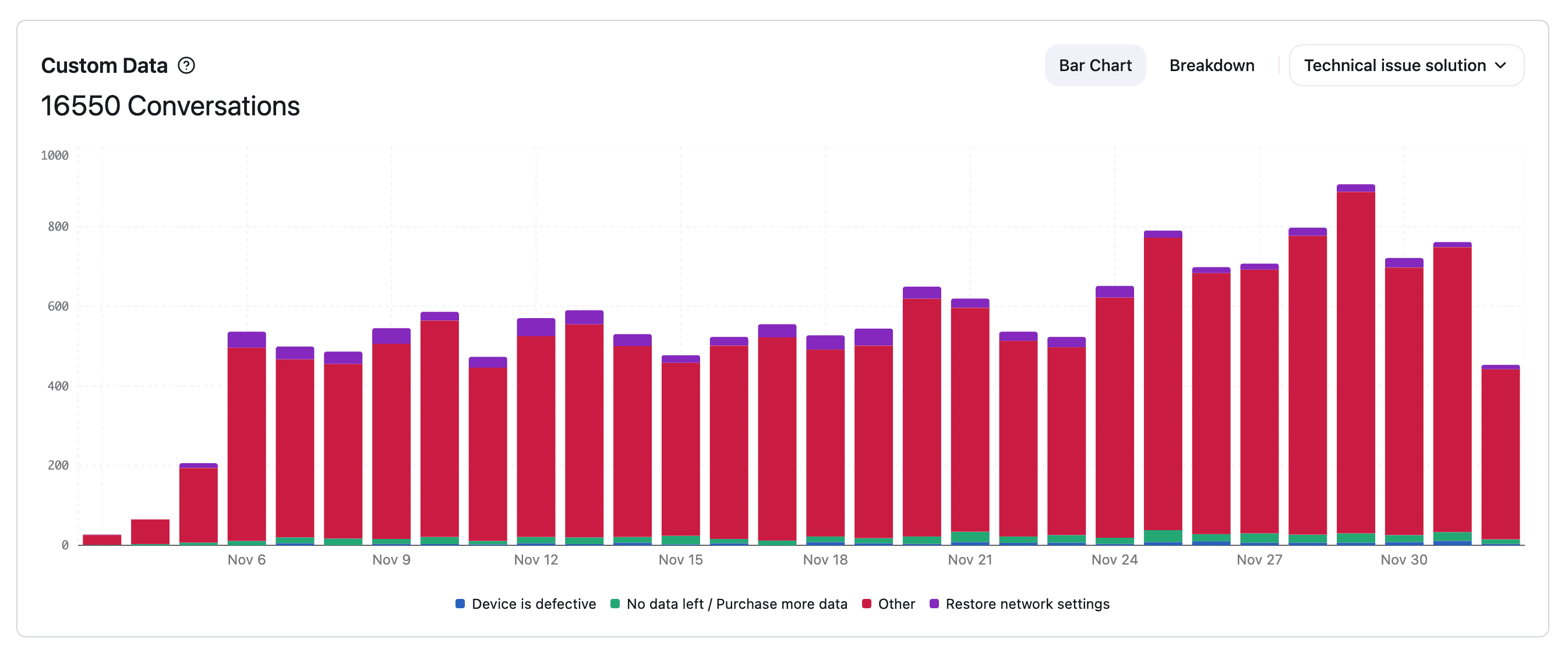
| Technical issue solution | What solution the bot proposed | No data left, Device is defective, Restore network settings, Other |
Payment and order status
Track operational patterns in how customers interact with orders.
| Field name | What to track | Example values |
|---|---|---|
| Payment issues | Whether the customer had trouble paying | Payment problem, No problem |
| Order status | Current state of the customer's order | In preparation, In transit, Delivered, Returned, Cancelled |
| Package opened on return | Whether the customer opened the package before returning | Yes, No |
| Payment method provided | Whether the customer shared bank details | Yes, No |
Security and compliance
Catch concerning behavior automatically.
| Field name | What to track | Example values |
|---|---|---|
| Bad intent detection | Whether the customer is trying to exploit the bot | Attempting to steal information, Trying to break security |
| Off-topic response detection | Whether the bot replied to questions unrelated to your business or support | Yes, No |
| Refund threat tracking | What leverage the customer used to demand a refund | Dispute/Chargeback, Scam accusation, Report to authorities, Bad review |
Analytics
Insights are available in Metrics → Data Collection.
You can:
- See how often each value appears across all conversations
- Compare trends by channel, product, or time period
- Spot rising issues early (e.g., "packaging leaks" spiking this month)
- Filter conversations by any collected field for deeper analysis
- Combine multiple fields to find patterns (e.g., cancellation reason and retention outcome)
This turns raw conversations into clear, structured data you can use to improve products, operations, and customer experience.
Examples